Trello backup tool

Since the last decennium, I've been a happy Trello user. After one customer added me to their board, I liked it so much, that I started to use Trello for everyday planning with a few personal boards (family planning etc). Later I added a few boards for my small business and volunteer work.

There's just one thing I'm missing: Backups. I haven't been able to find a backup solution that protects my cards, my boards or my workspaces in case something disastrous happens. However, Trello does have an API, and I've been planning to create my own backup tool for multiple years now. But as the saying goes: The painter's house is never painted.

Yesterday, someone I shared a workspace with, deleted that workspace without any warning. It was gone. Boards gone. Cards gone. Irrecoverable. That will never happen to me again. So I quickly created a backup tool, with some help.

Below, you'll find a link to TrelloDownloader.zip. It contains:

  • config.php - Template for your config
  • export.php - The actual exporter. It downloads workspaces, boards, cards and comments. I found that it was impossible to download attachments due to authorisation. Since I don't care about attachments for my purposes, and I couldn't find a solution several hours in, I decided to leave that for now.
  • download_later.php - Using this file you may be able to download attachments that export.php could not get. If you know how to fix it, that is.
  • index.php - When you run php -S localhost:8123 to start php's built-in webserver, you'll be able to browse your download data via http://localhost:8123
  • exports - An empty directory for the exports to be saved in.

To use:

  1. Review the code to check that it is not malware.
  2. Put your API keys in config.php
  3. Then run export.php from the command line. You may use export.sh to run export.php. If you use export.sh from a crob job, it will save the log file.
  4. When done, run php -S localhost:8123 and to go http://localhost:8123 to see if your data is really there.

Apart from the attachment download, I spent very little time on this script. I did some basic security checks, but there may still be bugs. I didn't mean it to run on a public server, but just on your local machine.

Enjoy!

Download TrelloDownloader.zip

© GeekLabInfo Trello backup tool is a post from GeekLab.info. You are free to copy materials from GeekLab.info, but you are required to link back to https://www.geeklab.info

1 Star2 Stars3 Stars4 Stars5 Stars (No Ratings Yet)
Loading...

iDeal error SO1000

One of my customers is still using a very old library for iDeal online payments.

It's old, but it's also really stable. Or rather, was stable. Until today. Today I tried to switch that customer from ideal.secure-ing.com to the new ideal-acquiring.ing.nl. That didn't go so well.

The switch itself was pretty simple. Change the merchant ID, do a little chair dance with the SSL certificates and change the hostname. Unfortunately, that turned out not to be the full fix.

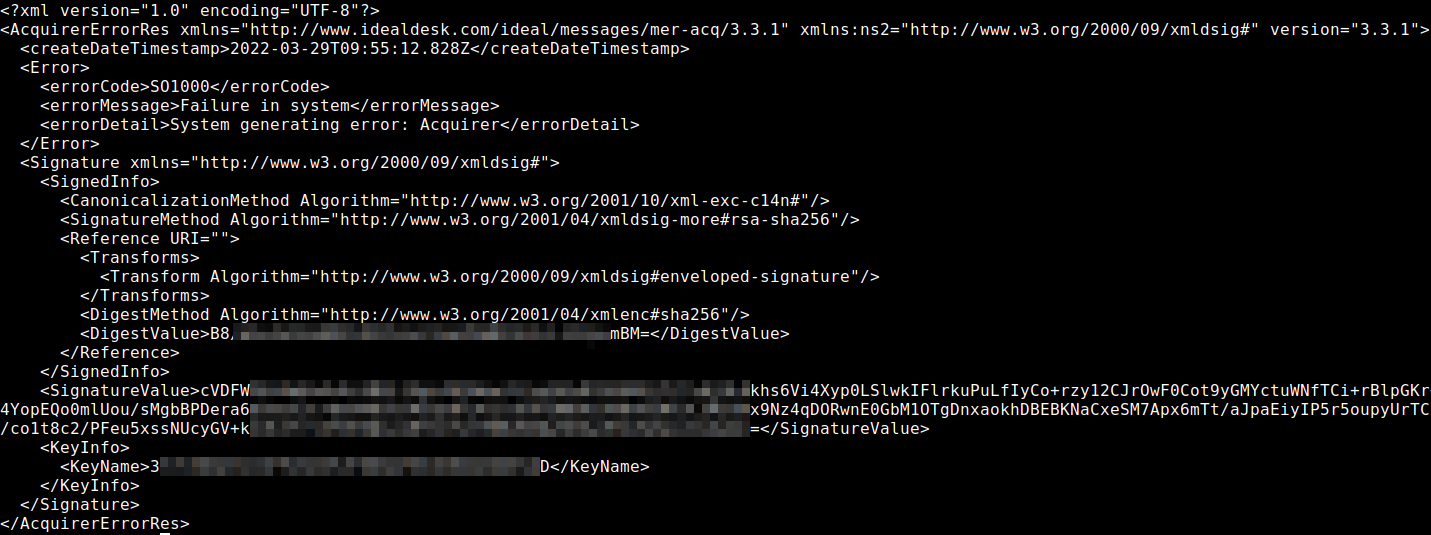
ING Bank kept returning this very useful error message "System generating error: Acquirer":

<errorCode>SO1000</errorCode><errorMessage>Failure in system</errorMessage><errorDetail>System generating error: Acquirer</errorDetail>
screenshot of xml error message

According to the iDeal manual, the Acquirer is the bank of the Merchant (=webshop). So when the website I'm working on is connecting to their bank, the bank basically says in their message that they themselves are having a technical issue. For several hours, both on the live environment and on sandbox environment. Sounds a bit unbelievable to me.

As a external consultant I cannot call the bank for help, I'm condemned to use public resources and spend a lot of time to find the issue here.

Took me several hours of trying to change certificates, changing the Merchant ID and other parameters, but nothing helped. Until I noticed the library this customer is using opens it's own connection to the bank:

<?php $f=fsockopen("ssl://ideal-acquiring.ing.nl", ...);

Could it be that the new environment requires different/more secure SSL/TLS? I did a tcpdump on the network and opened the dump in wireshark. The connection was using TLSv1.2, nothing to worry about.

Lets see what else this code does:

$out.='POST ' . $path . ' HTTP/1.0' . $this->CRLF;

Hey, that's weird. HTTP/1.0, did we not abandon that protocol 20 years ago? Could it be that using an old protocol blocks the whole transaction? Turns out I was right. I replaced the whole function to use curl, and the problem was instantly fixed:

protected function postToHost($url, $data, $timeout = 30 /*ignored now*/ ) {
            $url=preg_replace("#^ssl://#","https://",$url);
            $ch = curl_init($url);
            curl_setopt($ch, CURLOPT_POST, 1);
            curl_setopt($ch, CURLOPT_HTTPHEADER, array('Content-Type: text/xml'));
            curl_setopt($ch, CURLOPT_POSTFIELDS, "$data");
            curl_setopt($ch, CURLOPT_RETURNTRANSFER, 1);
            $output = curl_exec($ch);
            return $output;
}

That's it. For now. At some moment I'll probably advise this customer to change to a more modern iDeal lib.

I'm a bit annoyed though. The bank could give an answer that's more indicative of the problem. How hard is it for the ING Bank to always include a reason if the request gets past the webserver to begin with? The error message was digitally signed with a SSL-based XML signature, which I think means the backend application could have done better.

© GeekLabInfo iDeal error SO1000 is a post from GeekLab.info. You are free to copy materials from GeekLab.info, but you are required to link back to https://www.geeklab.info

1 Star2 Stars3 Stars4 Stars5 Stars (1 votes, average: 5.00 out of 5)
Loading...

My l10n makefile

To easily gather .pot files, combine them with existing .po files and converting them to .mo files, I created this makefile for use with automake:

.PHONY: _site.pot backup
POFILES:=$(wildcard *.po)
NOW=$(shell date +%s)
 
all:    backup
        make $(POFILES:.po=.mo)
 
%.mo:   %.po
        echo Generating $@
        msgfmt -o $@ $< || echo -e "\033[33;1m $@ is wrong \033[0m"
 
%.po:   _site.pot
        if [ -e $@ ]; then \
        mv $@ $(@:.po=.potmp) ; msgmerge --no-fuzzy-matching $(@:.po=.potmp) _site.pot > $@ ; \
        rm $(@:.po=.potmp) ; \
        else \
        echo Creating new file ; cp _site.pot $@ ; \
        fi
 
_site.pot: 
        find /var/www/html -iname "*.php" | grep -v wpcode > my-php-files
        xgettext --from-code=utf-8 -d site -f my-php-files --keyword=_e --keyword=__ -o - | sed "s/CHARSET/UTF-8/" > _site.pot
        rm my-php-files
 
backup:
        mkdir -f .backup
        tar zcf .backup/backup-$(NOW).tgz *.po Makefile

Continue Reading…

© GeekLabInfo
My l10n makefile is a post from GeekLab.info. You are free to copy materials from GeekLab.info, but you are required to link back to https://www.geeklab.info

1 Star2 Stars3 Stars4 Stars5 Stars (No Ratings Yet)
Loading...

Making broken link checker work with Woocommerce external products

I'm working on a new project to bring together all high quality WordPress themes on one website. Today I tried to make broken link checker work with Woocommerce external products.

When you configure the broken link checker to look for urls in the custom field named _product_url, BLC would find all these links. Unfortunately, this only works for posts and pages, but Woocommerce stores its products as product.

So, in order to make these plugins work together, you should add the post_type 'product' to both line 441 and 478 of broken-link-checker/modules/containers/custom_field.php

Guess it would be better if the plugin asked you which post_types should be included.© GeekLabInfo
Making broken link checker work with Woocommerce external products is a post from GeekLab.info. You are free to copy materials from GeekLab.info, but you are required to link back to https://www.geeklab.info

1 Star2 Stars3 Stars4 Stars5 Stars (No Ratings Yet)
Loading...

WordPress: custom links on plugin page

Since WordPress 2.8, you can easily add your own links to the plugin page. This can be useful to jump right to the settings of the plugin. Example code:

function set_plugin_meta($plugin_meta, $plugin_file, $plugin_data, $status){
if (plugin_basename(__FILE__)!=$plugin_file) return $plugin_meta;
return array_merge( $plugin_meta, array( sprintf( '&lt;a href="options-general.php?page=%s"&gt;%s&lt;/a&gt;', $plugin, __('Settings') ) ));
}
add_filter( 'plugin_row_meta', 'set_plugin_meta', 10, 2 );

Two other interesting plugin hooks are:

do_action( 'after_plugin_row', $plugin_file, $plugin_data, $status );
do_action( "after_plugin_row_$plugin_file", $plugin_file, $plugin_data, $status );

These are both run after the row was printed.© GeekLabInfo
WordPress: custom links on plugin page is a post from GeekLab.info. You are free to copy materials from GeekLab.info, but you are required to link back to https://www.geeklab.info

1 Star2 Stars3 Stars4 Stars5 Stars (No Ratings Yet)
Loading...

Arrrrgh! Kill it! Kill wp_attempt_focus with fire!

Somewhere around version 2.8.4 or something, WordPress introduced a "feature" to focus the username form and wipe the username. I dont want to type my username every time again and again and again. So what can we do to kill wp_attempt_focus? There is no hook available to disable that part of the code, but we can use some dirty tricks:

I created the following 'plugin' to get rid of it:
function kill_wp_attempt_focus($in){
return preg_replace('/function wp_attempt_focus/','function wp_attempt_focus(){} function wp_attempt_focus_killed',$in);
}
if($_SERVER["PHP_SELF"]=='/wp-login.php'){
ob_start('kill_wp_attempt_focus');
}

It grabs the output of /wp-login.php, renames the original wp_attempt_focus() to wp_attempt_focus_killed() and creates a new empty function to prevent errors.© GeekLabInfo
Arrrrgh! Kill it! Kill wp_attempt_focus with fire! is a post from GeekLab.info. You are free to copy materials from GeekLab.info, but you are required to link back to https://www.geeklab.info

1 Star2 Stars3 Stars4 Stars5 Stars (No Ratings Yet)
Loading...

WordPress timezone problems: fixed

I'm using WordPress as a framework for a website that reaches over 30.000 readers daily over several media. Some over the web, but most users receive posts by mail, sms or twitter using custom-made plugins. Since I can't have a broken mail sent to thousands of users, I rather don't upgrade WordPress, except when security issues have been found. Every single WordPress upgrade I've done has broken something, like when plugin hooks are renamed, and renamed back later....

Timezone support broken

After my latest upgrade, the sending queue got seriously screwed up. SMS messages that should have been sent around 8am, got send around midnight. Why? Because WordPress timezone support screws up the time!

WordPress gave me my WTF moment while testing with date(). I've been testing what was wrong, and came across a situation where a simple reload caused the timezone to shift 2 hours. This simple line of code echoed 1:30:00 at 1:30:00 while echoing 3:30:01 at 1:30:01:
<?php echo date("H:i:s"); ?>

This isn't such a problem for simple posts on a weblog, but for sending queued mail and sms messages this is fatal.

My solution

Screw WordPress. It'll get fixed in some future version of WordPress. For now I'll get a date I can actually trust from mysql:
$wpdb->getvar('select DATE_FORMAT(current_timestamp,"%H:%i:%s");');

I also replaced several other instances of date(), like:
"select * from wp_receipients where time_to_sent<".date("Hi")."'";
to
'select * from wp_receipients where time_to_sent<DATE_FORMAT(current_timestamp,"%H%i")';© GeekLabInfo
WordPress timezone problems: fixed is a post from GeekLab.info. You are free to copy materials from GeekLab.info, but you are required to link back to https://www.geeklab.info

1 Star2 Stars3 Stars4 Stars5 Stars (No Ratings Yet)
Loading...