Firefox configuration settings

Useful Firefox settings. Change them in about:config

security.dialog_enable_delayThe delay in ms before you can click the "install plugin" button.
dom.max_script_run_timeMaximum script runtime in seconds before Firefox asks if you want to terminate the script.
© GeekLabInfo Firefox configuration settings is a post from GeekLab.info. You are free to copy materials from GeekLab.info, but you are required to link back to https://www.geeklab.info

1 Star2 Stars3 Stars4 Stars5 Stars (No Ratings Yet)
Loading...

CUPS ERROR: Unable to write raster data to driver!

On my CUPS server, I've connected a Dymo 400 labelwriter. For some reason, while printing labels perfectly, I just can't get the imagetoraster filter to stop "crashing" with the following error:
ERROR: Unable to write raster data to driver!

So I fixed this the dirty way. I downloaded the CUPS Source RPM from CentOS. I installed it to /usr/src/redhat using the command rpm -i cups-1.4.2-35.el6.src.rpm. In the directory SOURCES, I added a file named geeklab.patch containing:

--- cups-1.4.2/filter/imagetoraster.c   2009-06-05 23:38:52.000000000 +0200
+++ cups-1.4.2/filter/imagetoraster.cpatched    2011-10-21 11:18:28.427271405 +0200
@@ -1197,7 +1197,7 @@
                fputs(_("ERROR: Unable to write raster data to driver!\n"),
                      stderr);
                cupsImageClose(img);
-               exit(1);
+               exit(0);
              }
             }
          }
@@ -1293,7 +1293,7 @@
               fputs(_("ERROR: Unable to write raster data to driver!\n"),
                    stderr);
              cupsImageClose(img);
-             exit(1);
+             exit(0);
            }
 
            /*
@@ -1333,7 +1333,7 @@
                fputs(_("ERROR: Unable to write raster data to driver!\n"),
                      stderr);
                cupsImageClose(img);
-               exit(1);
+               exit(0);
              }
             }
          }

Then I added to the spec:
Patch700: geeklab.patch
after the line that starts with Patch100:
and %patch700 -p1 -b .geeklab just after the line that starts with %patch100

Now you can use the regular rpmbuild commands to build packages:
rpmbuild -bs <specname> to build a new SRPM
rpmbuild -ba <specname> to build a new SRPM and binary RPMs
I personally prefer the first, as I mostly use mock to build clean destination RPMs.

© GeekLabInfo CUPS ERROR: Unable to write raster data to driver! is a post from GeekLab.info. You are free to copy materials from GeekLab.info, but you are required to link back to https://www.geeklab.info

1 Star2 Stars3 Stars4 Stars5 Stars (No Ratings Yet)
Loading...

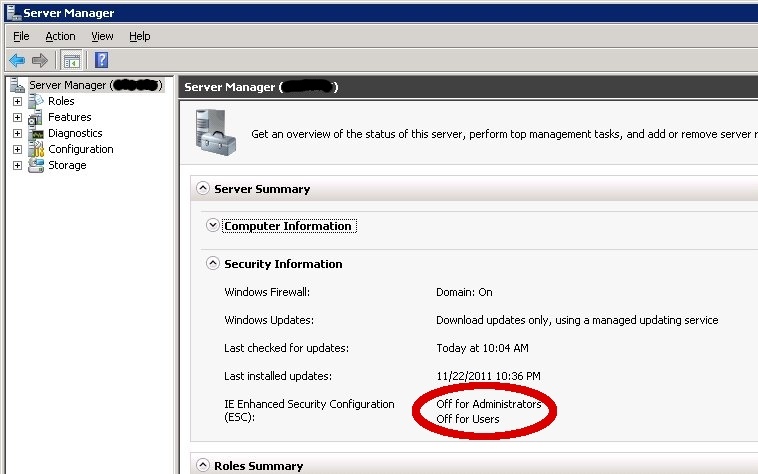
Turn off Internet Explorer Enhanced Security Configuration in Windows Server 2008

  • Start Server Manager (servermanager.msc)
  • Go to the top node named "Server Manager (SERVERNAME)"
  • On the right side, under server summary>Security information, disable IE Enhanced Security Configuration (ESC) for whoever you like.
© GeekLabInfo Turn off Internet Explorer Enhanced Security Configuration in Windows Server 2008 is a post from GeekLab.info. You are free to copy materials from GeekLab.info, but you are required to link back to https://www.geeklab.info

1 Star2 Stars3 Stars4 Stars5 Stars (No Ratings Yet)
Loading...

Unable to connect to CUPS server localhost:631 – Connection refused

On my fileserver, I have printing disabled in Samba but still I get all these messages in the logs:
[2011/12/08 10:18:26.821280, 0] printing/print_cups.c:108(cups_connect)
Unable to connect to CUPS server localhost:631 - Connection refused

I don't want Samba to offer printers. After trying some configurations, I found this made smbd stop trying:

load printers = no
printing = bsd
printcap name = /dev/null
© GeekLabInfo Unable to connect to CUPS server localhost:631 - Connection refused is a post from GeekLab.info. You are free to copy materials from GeekLab.info, but you are required to link back to https://www.geeklab.info

1 Star2 Stars3 Stars4 Stars5 Stars (3 votes, average: 5.00 out of 5)
Loading...

Using Ctrl+Alt+F1 in a VMWare Virtual Machine

When you're running Linux, pressing CTRL+ALT+F1 will bring you to console #1. If you want to go to the console of a vmware guest, this won't work, because the host will go to the console instead of the guest. Making it pretty hard to get to a console.

The correct combination for linux-in-vmware-on-linux is CTRL+ALT+SPACE, release space while holding down CTRL+ALT, then add the F1 key.

© GeekLabInfo Using Ctrl+Alt+F1 in a VMWare Virtual Machine is a post from GeekLab.info. You are free to copy materials from GeekLab.info, but you are required to link back to https://www.geeklab.info

1 Star2 Stars3 Stars4 Stars5 Stars (No Ratings Yet)
Loading...

Change Thunderbird time format

To edit the Thunderbird time format on Linux, edit /usr/bin/thunderbird. Just before the line exec $MOZ_PROGRAM "$@" add one more line:
export LC_TIME=nl_NL
(or any other language of your choice)

There are probably other/easier ways to do this, but since I want this to only affect thunderbird, I prefer this method.

© GeekLabInfo Change Thunderbird time format is a post from GeekLab.info. You are free to copy materials from GeekLab.info, but you are required to link back to https://www.geeklab.info

1 Star2 Stars3 Stars4 Stars5 Stars (No Ratings Yet)
Loading...

PXEboot with CentOS 5.6 and dnsmasq

Install the required software:
yum install dnsmasq

Open up the firewall:
/sbin/iptables -I INPUT -m udp -p udp --dport 67 -j ACCEPT
/sbin/iptables -I INPUT -m udp -p udp --dport 53 -j ACCEPT

Then run:
dnsmasq -d --interface=br0 --dhcp-range=181.30.68.111,static --dhcp-host=84:2b:2b:78:30:79,181.30.68.112 --dhcp-option=option:router,181.30.68.65 --dhcp-boot=pxelinux.0 --enable-tftp --tftp-root=/var/ftpd

Put all required files, such as pxelinux.0 from the package syslinux in /var/ftpd

Ubuntu/Debian

I'm running RedHat-based software on all of my machines. Above information may be useful for Ubuntu/Debian users, but it's not tested and I'm not supporting it.

Servers: RedHat Enterprise Linux/CentOS is more suitable for servers, as there's a lot of professional level support available. I think that's important, because if I say, get a car accident, I want the servers to be managable by another professional.

Desktops/Laptops: RPM packages are pretty exchangable between RedHat-based platforms. That's a good reason to run Fedora on the desktop.
© GeekLabInfo PXEboot with CentOS 5.6 and dnsmasq is a post from GeekLab.info. You are free to copy materials from GeekLab.info, but you are required to link back to https://www.geeklab.info

1 Star2 Stars3 Stars4 Stars5 Stars (No Ratings Yet)
Loading...