A Hexadecimal color code looks like #ff7f00. This means:
red: ff hexadecimal = 255 decimal
green: 7f hexadecimal = 127 decimal
blue: 00 hexadecimal = 0 decimal
And that will generate a orange color with hex value ff7f00.
One can think of several very difficult methods to generate 3 numbers between 0 and 255, then concatenating their hexadecimal values. But there's a much easier way.
Since the string is formatted as a 6 character string, the value of which is between 000000 and ffffff (hex), you could just pick any random value between 0 and 16777215 (=hex ffffff) and convert that to a hex string.
Both of these lines will generate a random Hex Color Code:
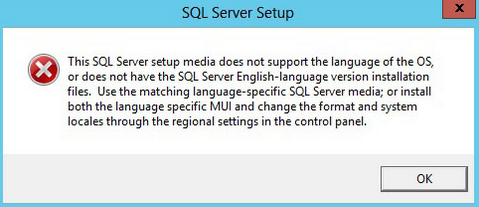
While installing Microsoft SQL Server on a VMWare, I had this error:
"This SQL Server setup media does not support the language of the OS, or does not have the SQL Server English language version installation files. Use the matching language-specific SQL Server media, or install both the language specific MUI and change the format and system locales through the regional settings in the control panel."
I found a lot of possible solutions, especially those on https://www.ryadel.com/en/sql-server-2017-setup-install-error-oops-language-not-supported-rules-fix/ looked promising. But they did not work in the end.
The solution turned out to be mounting the iso file locally on the target machine. SQL Server comes as a .iso file. If you mount that via VMWare CDROM emulation or via a network share, you'll run into problems installing. But copy the iso to the target machine and double click it, then you can run setup.exe without problems.
A lot of people are complaining about being unable to (re)install Logi Capture, the software that comes with modern Logi (formerly known as Logitech) webcams.
The complaints
For example, Sasha says: "Logi Capture Version 2.06.8 will not complete installing on my Windows 10 PC. The .exe file immediately jumps to a "Restart Required" screen, and upon reboot nothing happens. Have cleared regisistry and removed all other logitech files.", to which the customer support gives an answer that indicates they didn't even read the question.
Michael says: "can't install Logi Capture software for my Brio anymore. I get the restart required splash screen after clicking the exe. Restart doesn't solve the issue. Cleaning up the registry doesn't help either. using Win 10 (1909)"
And Jason says: "I just uninstalled Logitech Capture 2.00.226 from my Windows 10 64bit. Then I went to install it again as an Admin, but I now get a window telling me, Restart Required - "Restart is required to continue with LogitechCapture installation." I have followed this process 3 times, with no installation complete. FYI- I have Skype for Business and ZOOM installed on my machine. Skype and another Softphone client that has video conferencing login upon startup."
I think I figured out how to fix this issue. I first installed version 2.08.11, which has some bugs. After removing that version, I ran into the same message trying to install version 2.06.12. Restarting the computer didn't fix anything.
My analysis
It seems that when uninstalling LogiCapture, the old version leaves uninstall instructions in the registry, the LogiCaptureSetupNeedReboot key in the RunOnce section to be exact. The installer expects Windows to run a command based on that, and then remove the data from the registry. It is normal for uninstallers to do such a thing, but Logi has done it wrong: when you're running a 64-bit computer, it writes to the 64-bit registry. Apparently, Windows doesn't even look at the 64-bit version of the registry for RunOnce entries. Therefore, after uninstalling the software from a 64-bit computer, you can never reinstall Logi Capture anymore.
My fix
Fixing this issue is simple. Just remove the wrong entry from the registry
click start type "cmd" and then press ctrl+shift+enter to run cmd as administrator then in the command line screen, type:
After this, I could start Capture_2.06.12.exe or Capture_2.08.11.exe to reinstall Logi Capture.
Please use these tips at your own responsibility.
The real fix
Of course, Logi should fix this in their installer/uninstaller. But given that version 2.08 introduced an annoying message in big red letters to push you away from Logi Capture to another product, I don't think we'll get a real solution soon.
Apart from changing the rwxr-xr-x like permissions, some Linux filesystems have another way of protecting files. You cam make them IMMUTABLE, after which no program can change them. Not even if you have the right permissions. Python however does not support reading or writing the immutable attribute.
Inspired by yellowcrescent, I just wrote the following code snippet for my own use:
# Code from geeklab.info
import fcntl
from array import array

# FS constants - see /uapi/linux/fs.h in kernel source
# or <elixir.free-electrons.com/linux/latest/source/include/uapi/linux/fs.h>
FS_IOC_GETFLAGS = 0x80086601
FS_IOC_SETFLAGS = 0x40086602
FS_IMMUTABLE_FL = 0x010

def chattri(filename: str, value: bool):
    with open(filename,'r') as f:
        arg = array('L', [0])
        fcntl.ioctl(f.fileno(), FS_IOC_GETFLAGS, arg, True)
        if value:
            arg[0]=arg[0] | FS_IMMUTABLE_FL
        else:
            arg[0]=arg[0] &~ FS_IMMUTABLE_FL
        fcntl.ioctl(f.fileno(), FS_IOC_SETFLAGS, arg, True)

def lsattri(filename: str) -> bool:
    with open(filename,'r') as f:
        arg = array('L', [0])
        fcntl.ioctl(f.fileno(), FS_IOC_GETFLAGS, arg, True)
    return bool(arg[0] & FS_IMMUTABLE_FL)

f="/root/testfile"
print("Yes" if lsattri(f) else "No")
chattri(f,False)
print("Yes" if lsattri(f) else "No")
chattri(f,False)
print("Yes" if lsattri(f) else "No")
Use it as you like, at your own risk. If possible please link my website.
Keep in mind that only users with root-access can change file attributes.
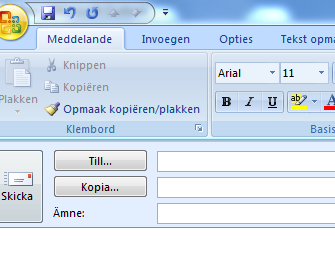
Last night Microsoft released several updates. One of them sets the language of parts of Outlook 2007 installations to Swedish. Turns out, this is KB4011086. Uninstalling KB4011086 reverts all of outlook to the correct language.
Last night Microsoft released several updates. One of them sets the language of parts of Dutch Outlook 2007 installations to Swedish. Turns out, this is KB4011086. Uninstalling KB4011086 reverts all of outlook to the correct language.
The last few months, I've noticed brand new clean Windows 7 installs have a hard time updating for the first time. Doesn't matter if they are updating from the original Microsoft update service of from a WSUS server, the time until the first update sometimes can be hours.