What are chained SSL certificates?
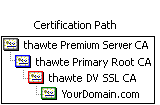 Normal "single root" certs are only certified by one single parent which is recognised by clients immediately. Chained certs on the other side are signed by a parent which itself is signed by another parent. This effectively makes your cert a "grandchild" of the CA root. In the image attached you'll see a cert that is chained by two intermediate certs.
How to use chained SSL certificates?
The several server software distributions require different types of configuration. This page is not telling you how to set up ssl for your software, I'm just telling how to use chained certs with the different programs.
Apache
Apache has quite some SSL functionality on board. I'm not gonna discuss it all, just want to say that the words you're looking for are:
SSLCertificateFile [path to crt file here]
SSLCertificateKeyFile [path to key file here]
SSLCACertificateFile [path to intermediate ca certs bundle here]
I downloaded the intermediate CA certs from my SSL provider: https://search.thawte.com/support/ssl-digital-certificates/index?page=content&id=AR1371 . Your SSL provider has a page with their own intermediate CA certs.
PureFTPd
My PureFTPd key and cert are all located in /etc/pure-ftpd/pure-ftpd.pem. In order to make ftp clients accept the SSL cert, i performed the following steps:
- I downloaded the intermediate CA certs from my SSL provider: https://search.thawte.com/support/ssl-digital-certificates/index?page=content&id=AR1371 . Your SSL provider has a page with their own intermediate CA certs.
- I combined the contents of the key, my own cert and the intermediate CA certs to /etc/postfix/ssl/smtpd.pem. I don't know if the order of the certs is important, but just to be sure I went back one parent at a time. So my file contains from top to bottom: my private key, certificate for my domain, thawte DV SSL CA, thawte primary root. It doesn't need thawte primary server CA as your client already has this one.
- Test it: openssl s_client -connect [your-hostname]:21 -starttls ftp
Dovecot
My dovecot SSL key is located in /etc/pki/dovecot/private/dovecot.pem and my SSL cert is /etc/pki/dovecot/certs/dovecot.pem. In order to make email clients accept the SSL cert, i performed the following steps:
- I downloaded the intermediate CA certs from my SSL provider: https://search.thawte.com/support/ssl-digital-certificates/index?page=content&id=AR1371 . Your SSL provider has a page with their own intermediate CA certs.
- I added the contents of the intermediate CA certs to /etc/pki/dovecot/certs/dovecot.pem. I don't know if the order of the certs is important, but just to be sure I went back one parent at a time. So my file contains from top to bottom: YourDomain.com, thawte DV SSL CA, thawte primary root. It doesn't need thawte primary server CA as your client already has this one.
- Test pop3s: openssl s_client -connect popserver:995
- Test imaps: openssl s_client -connect imapserver:995
Postfix
My postfix key and cert are all located in /etc/postfix/ssl/smtpd.pem.
In order to make email clients accept the SSL cert, i performed the following steps:
- I downloaded the intermediate CA certs from my SSL provider: https://search.thawte.com/support/ssl-digital-certificates/index?page=content&id=AR1371 . Your SSL provider has a page with their own intermediate CA certs.
- I combined the contents of the key, my own cert and the intermediate CA certs to /etc/postfix/ssl/smtpd.pem. I don't know if the order of the certs is important, but just to be sure I went back one parent at a time. So my file contains from top to bottom: my private key, certificate for my domain, thawte DV SSL CA, thawte primary root. It doesn't need thawte primary server CA as your client already has this one.
- Test smtps: openssl s_client -connect [your-hostname]:465
- Test smtp with starttls: openssl s_client -connect [your-hostname]:25 -starttls smtp


 (8 votes, average: 3.88 out of 5)
 Loading...
pure-ftpd expects the combined certificate to be of format:
-----BEGIN RSA PRIVATE KEY-----
(Your Private Key: your_domain_name.key)
-----END RSA PRIVATE KEY-----
-----BEGIN CERTIFICATE-----
(Your Primary SSL certificate: your_domain_name.crt)
-----END CERTIFICATE-----
-----BEGIN CERTIFICATE-----
(Your Intermediate certificate: from_cert_provider.crt)
-----END CERTIFICATE-----
-----BEGIN CERTIFICATE-----
(Your Root certificate: from_cert_provider.crt)
-----END CERTIFICATE-----