A colleague of mine has some family issues that require him to be home more often. However, work continues. So he started working at home with a laptop. Nothing special about that. What is special, is that we're running a piece of software ("RR") that has old-style telnet-like terminals, which is sending it's print jobs straight to the printer.
His laptop has a direct VPN connection to the company network, but his printer doesn't.
Network info
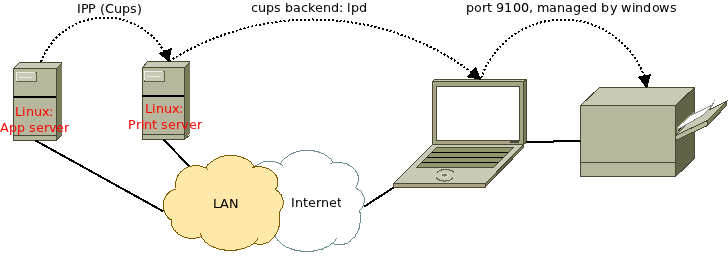
The old software ("RR") is running on a pretty new RHEL 5.6 installation. It uses CUPS to queue and deliver print jobs. In my situation, the RR printer has zero printers configured, there's another Linux server that has all printers configured and broadcasts those printers over the network. But you could leave that print server out.
Problem
RR cannot reach the printer directly. But it can reach the laptop, which is running Windows 7 Professional. I searched for an IPP server that I could install on Windows, so that the printserver could use that to relay messages to the local printer, but I couldn't find any.
Solution
Windows 7 still has the option to install an lpd server. It's not installed by default, but it's very simple to install.
Windows setup:
- In the Windows 7 Control Panel
- Go to the "Programs and Features"
- Click "Turn Windows Features on or off"
- Turn on the LPD protocol.
- Now go to the "printers" and share all printers you want to share.
- Don't use long names and names with spaces, like "HP Laserjet 4200 Series", which are hard to setup on the client. Use something short like hplj4200.
Client setup:
Now you can setup the client to print to lpd://[ip-or-hostname-of-client]/[printername], for example lpd://10.10.10.17/hplj4200
If you can't get it to work, please check printer permissions and the firewall of the Windows 7 machine, which must have port 515 open.
© GeekLabInfo Printing from a CUPS server to Windows 7 is a post from GeekLab.info. You are free to copy materials from GeekLab.info, but you are required to link back to http://www.geeklab.info
 (2 votes, average: 3.00 out of 5)
 Loading...
(spammer)'s 1-Port Multi-Function USB Produce Server, type (spammers product name), turns many stand-alone multi-function along with common USB laser printers into a discussed circle source. Install your multifunction printing device from the many ergonomic office spot after which it link the actual stream-lined (spammers product name) to some wired circle. Visit (spammers website) to learn more.
Admin reply: Dear mr or mrs Bangladesi spammer,
Do you think I believe you read the whole post AND typed a reply in a total of just 9 seconds?
Please go bug someone else.